
Kunde hätte gerne, das die WooCommerce Coupons nur an bestimmten Wochentagen gültig sind. Das ist mit diesen Code möglich.
Am besten mit FluentSnippets einbauen.
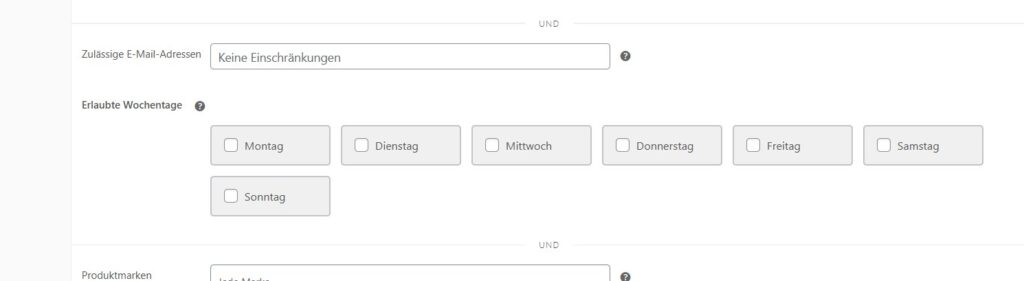
/**
 * WooCommerce Gutscheine auf Wochentage beschränken
*/

// 1. Füge CSS für die Checkboxen hinzu

add_action('admin_enqueue_scripts', 'enqueue_weekday_checkbox_styles');
function enqueue_weekday_checkbox_styles($hook) {
    // Nur auf der Gutschein-Bearbeitungsseite laden
    if ('post.php' !== $hook && 'post-new.php' !== $hook) {
        return;
    }

    global $post_type;
    if ('shop_coupon' !== $post_type) {
        return;
    }

    // Inline CSS hinzufügen
    $custom_css = "
        .weekday-checkboxes {
            display: grid !important;
            grid-template-columns: repeat(auto-fit, minmax(120px, 1fr)) !important;
            gap: 12px !important;
            margin-top: 8px !important;
            max-width: 900px !important;
        }

        .weekday-restriction-field {
        display: grid;
        }
        .weekday-checkbox-label {
            display: grid !important;
            grid-template-columns: auto 1fr !important;
            align-items: center !important;
            gap: 8px !important;
            padding: 10px 14px !important;
            background: #f0f0f1 !important;
            border: 2px solid #c3c4c7 !important;
            border-radius: 4px !important;
            cursor: pointer !important;
            transition: all 0.2s ease !important;
            user-select: none !important;
            font-size: 13px !important;
            margin: 0px!important;
            width: auto!important;
        }

        .weekday-checkbox-label:hover {
            background: #e5e5e5 !important;
            border-color: #8c8f94 !important;
        }

        .weekday-checkbox-label input[type='checkbox'] {
            margin: 0 !important;
            cursor: pointer !important;
            width: 16px !important;
            height: 16px !important;
        }

        .weekday-checkbox-label input[type='checkbox']:checked {
            accent-color: #2271b1 !important;
        }

        .weekday-checkbox-label.checked {
            background: #2271b1 !important;
            color: #fff !important;
            border-color: #2271b1 !important;
        }

        .weekday-restriction-field {
            margin-bottom: 12px !important;
        }

        .weekday-restriction-field > label {
            display: block !important;
            margin-bottom: 4px !important;
            font-weight: 600 !important;
        }

        @media (max-width: 782px) {
            .weekday-checkboxes {
                grid-template-columns: repeat(2, 1fr) !important;
            }
        }
    ";

    wp_add_inline_style('wp-admin', $custom_css);

    // JavaScript für checked-Klasse

    ?>
    <script>
    jQuery(document).ready(function($) {
        // Funktion zum Aktualisieren der checked-Klasse
        function updateCheckedLabels() {
            $('.weekday-checkbox-label').each(function() {
                var checkbox = $(this).find('input[type="checkbox"]');
                if (checkbox.is(':checked')) {
                    $(this).addClass('checked');
                } else {
                    $(this).removeClass('checked');
                }
            });
        }

        // Initial ausführen

        updateCheckedLabels();

        // Bei Änderungen aktualisieren

        $('.weekday-checkbox-label input[type="checkbox"]').on('change', updateCheckedLabels);
    });
    </script>
    <?php
}

// 2. Füge Checkboxen für Wochentage zum Gutschein hinzu

add_action('woocommerce_coupon_options_usage_restriction', 'add_weekday_restriction_field', 10, 2);
function add_weekday_restriction_field($coupon_id, $coupon) {
    $allowed_weekdays = get_post_meta($coupon_id, 'allowed_weekdays', true);
    if (!is_array($allowed_weekdays)) {
        $allowed_weekdays = array();
    }

    $weekdays = array(
        '1' => __('Montag', 'woocommerce'),
        '2' => __('Dienstag', 'woocommerce'),
        '3' => __('Mittwoch', 'woocommerce'),
        '4' => __('Donnerstag', 'woocommerce'),
        '5' => __('Freitag', 'woocommerce'),
        '6' => __('Samstag', 'woocommerce'),
        '0' => __('Sonntag', 'woocommerce'),
    );

    echo '<div class="options_group">';
    echo '<p class="form-field weekday-restriction-field">';
    echo '<label>' . __('Erlaubte Wochentage', 'woocommerce');
    echo ' <span class="woocommerce-help-tip" data-tip="' . esc_attr__('Wählen Sie die Wochentage aus, an denen dieser Gutschein gültig ist. Wenn nichts ausgewählt ist, gilt der Gutschein an allen Tagen.', 'woocommerce') . '"></span>';
    echo '</label>';

    echo '<span class="weekday-checkboxes">';
    foreach ($weekdays as $day_value => $day_name) {
        $checked = in_array($day_value, $allowed_weekdays) ? 'checked="checked"' : '';
        echo '<label class="weekday-checkbox-label">';
        echo '<input type="checkbox" name="allowed_weekdays[]" value="' . esc_attr($day_value) . '" ' . $checked . ' />';
        echo esc_html($day_name);
        echo '</label>';
    }
    echo '</span>';
    echo '</p>';
    echo '</div>';
}

// 2. Speichere das benutzerdefinierte Feld

add_action('woocommerce_coupon_options_save', 'save_weekday_restriction_field');
function save_weekday_restriction_field($coupon_id) {
    $allowed_weekdays = isset($_POST['allowed_weekdays']) ? array_map('sanitize_text_field', $_POST['allowed_weekdays']) : array();
    update_post_meta($coupon_id, 'allowed_weekdays', $allowed_weekdays);
}

// 3. Validiere den Gutschein basierend auf dem Wochentag

add_filter('woocommerce_coupon_is_valid', 'validate_coupon_weekday', 10, 3);
function validate_coupon_weekday($valid, $coupon, $discount) {
    if (!$valid) {
        return $valid;
    }

    $coupon_id = $coupon->get_id();
    $allowed_weekdays = get_post_meta($coupon_id, 'allowed_weekdays', true);

    // Wenn keine Einschränkung gesetzt ist, ist der Gutschein gültig
    if (empty($allowed_weekdays) || !is_array($allowed_weekdays)) {
        return $valid;
    }

    // Hole den aktuellen Wochentag (0 = Sonntag, 1 = Montag, usw.)
    $current_weekday = date('w');

    // Prüfe, ob der aktuelle Wochentag erlaubt ist
    if (!in_array($current_weekday, $allowed_weekdays)) {
        throw new Exception(__('Dieser Gutschein ist nur an bestimmten Wochentagen gültig.', 'woocommerce'));
    }

    return $valid;
}

// 4. Zeige eine detaillierte Fehlermeldung mit den erlaubten Tagen

add_filter('woocommerce_coupon_error', 'custom_weekday_error_message', 10, 3);
function custom_weekday_error_message($err, $err_code, $coupon) {
    if ($err_code === WC_Coupon::E_WC_COUPON_INVALID_FILTERED) {
        $coupon_id = $coupon->get_id();
        $allowed_weekdays = get_post_meta($coupon_id, 'allowed_weekdays', true);

        if (!empty($allowed_weekdays) && is_array($allowed_weekdays)) {
            $weekday_names = array(
                '0' => 'Sonntag',
                '1' => 'Montag',
                '2' => 'Dienstag',
                '3' => 'Mittwoch',
                '4' => 'Donnerstag',
                '5' => 'Freitag',
                '6' => 'Samstag'
            );

            $allowed_names = array();
            foreach ($allowed_weekdays as $day) {
                if (isset($weekday_names[$day])) {
                    $allowed_names[] = $weekday_names[$day];
                }
            }

            if (!empty($allowed_names)) {
                $err = sprintf(
                    __('Dieser Gutschein ist nur an folgenden Tagen gültig: %s', 'woocommerce'),
                    implode(', ', $allowed_names)
                );
            }
        }
    }

    return $err;
}